To scrape data from authenticated sites means automating login and then accessing protected pages. In practice, you’ll encounter:
- Login Mechanisms: Simple form-based login, HTTP Basic Auth, etc.
- Additional Protections: CSRF tokens, Web Application Firewalls, and Multi-Factor Authentication
This guide shows how to handle each layer with Python, plus with key legal and ethical considerations you should know before scraping logged-in areas.
Note: This article is for informational purposes only. ScrapeHero does not scrape data from authenticated sites. Authenticated scraping should only be done on sites you own or have explicit permission to access.
Key Takeaways
- What is authenticated web scraping?
- What are the popular authentication mechanisms?
- Which tools are appropriate?
- What are the legalities you should consider?
- How do you handle a single login form?
- How can you automate CSRF-based authentication?
- How to manage Web Application Firewalls?
- How to handle Multi Factor Authentication?
Understanding Authenticated Websites
To scrape data from authenticated sites, first, understand the authentication mechanisms. That’ll tell you what tools you’ll need. Some common mechanisms include:
- Basic Authentication: This method requires users to provide a username and password.
- CSRF Tokens: The site also requires a dynamically generated token in addition to the username and password.
- Web Application Firewalls(WAF): WAF analyzes the incoming requests before they reach the web application. It checks for patterns to detect attacks but also poses significant challenges while scraping.
- Multi-Factor Authentication (MFA): Some websites require additional verification steps, such as Time-based One-Time Passwords (TOTP)
This article will discuss all the above one by one.
Is It Possible to Scrape Authenticated Websites?
Yes, it is possible to scrape authenticated websites. However, you need to understand how to handle the mechanisms discussed above. In each case, the tools required will be different. Moreover, you need to understand the legalities.
Let’s start with the legal part.
Legal and Ethical Considerations
Before you learn how to scrape data from authenticated sites, you need to know that it is legally risky. And you should understand the legalities surrounding web scraping before proceeding.
Even scraping public data can come under legal scrutiny if you are not careful. This Clearview AI case is the proof.
That means you need to think about all the nuances. Here are some key points to consider:
- Robots.txt: Most websites have a robots.txt file that outlines what parts of the site can bots access. The robots.txt file itself is not legally binding, but courts may consider it when assessing good faith. Ignoring it may not create liability, yet bypassing authentication or technical blocks can trigger CFAA-style and breach-of-contract claims.
- Terms of Service: Many websites have terms that prohibit automated data extraction. Ignoring these can lead to account bans or legal trouble. It’s essential to read and understand these terms before proceeding with your scraping efforts.
- Privacy Laws: Laws like GDPR in Europe and CCPA in California have strict rules on handling personal data. If you’re planning to scrape password-protected sites, obtain consent, handle personal data responsibly, limit collection to the minimum necessary, document your lawful basis, and avoid special-category data.
Python Libraries Required to Scrape Data from Authenticated Sites
Here are some popular Python libraries for web scraping:
- Requests: This library allows you to send HTTP requests easily and manage cookies, making it easier to log in and maintain sessions throughout your scraping session.
- BeautifulSoup: Ideal for parsing HTML once you’ve accessed the content, BeautifulSoup makes it easy to navigate and extract the information you need from web pages.
- Playwright: Essential for interacting with dynamic content that loads via JavaScript; Playwright automates browser actions, allowing you to simulate user interactions on the site.
- PyOTP: Used for generating and verifying one-time passwords for 2FA/MFA.
Basic Authentication (Username + Password)
For sites using basic authentication, you can simply make a post request to the endpoint with the username and password as the payload.
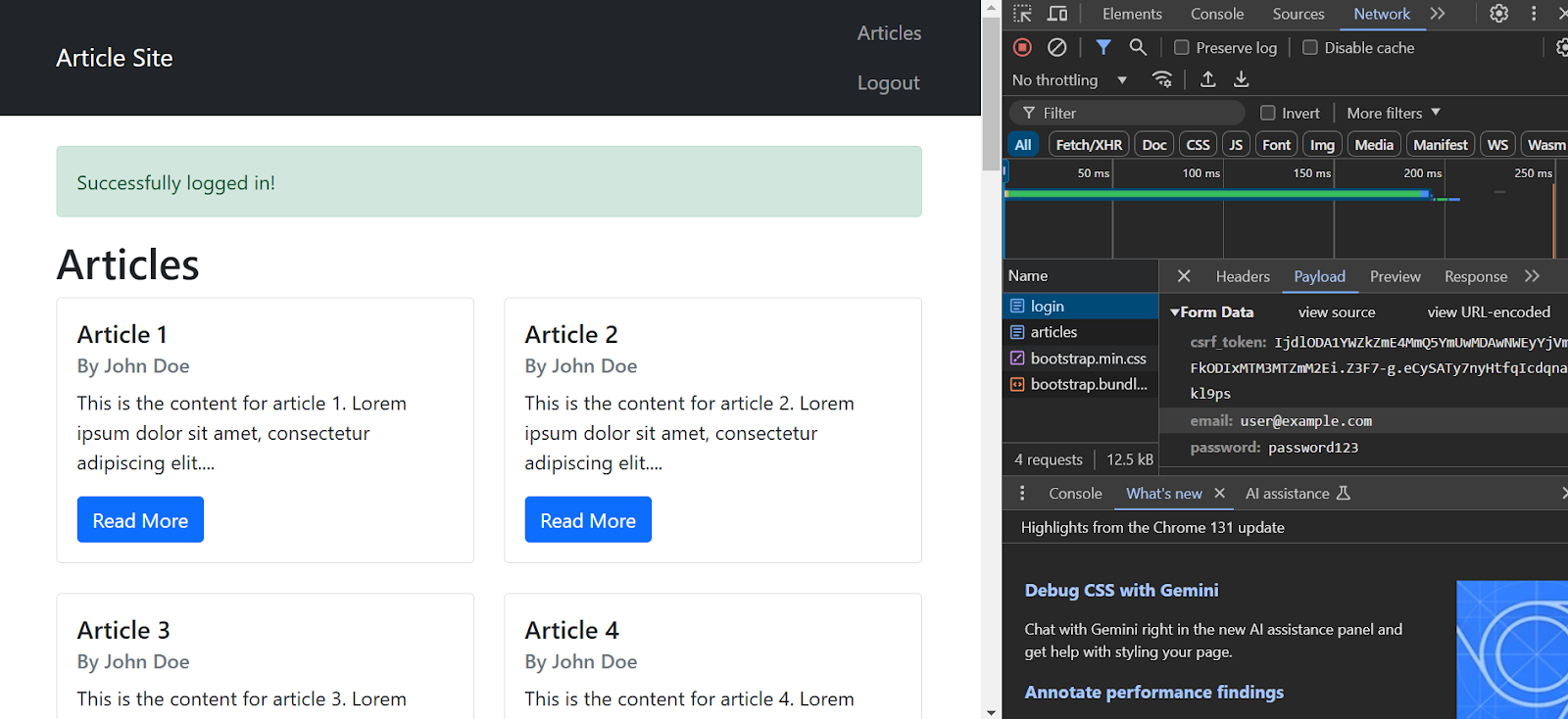
However, you need to find items to include in your payload. To do so, inspect the login page and go to the network tab.
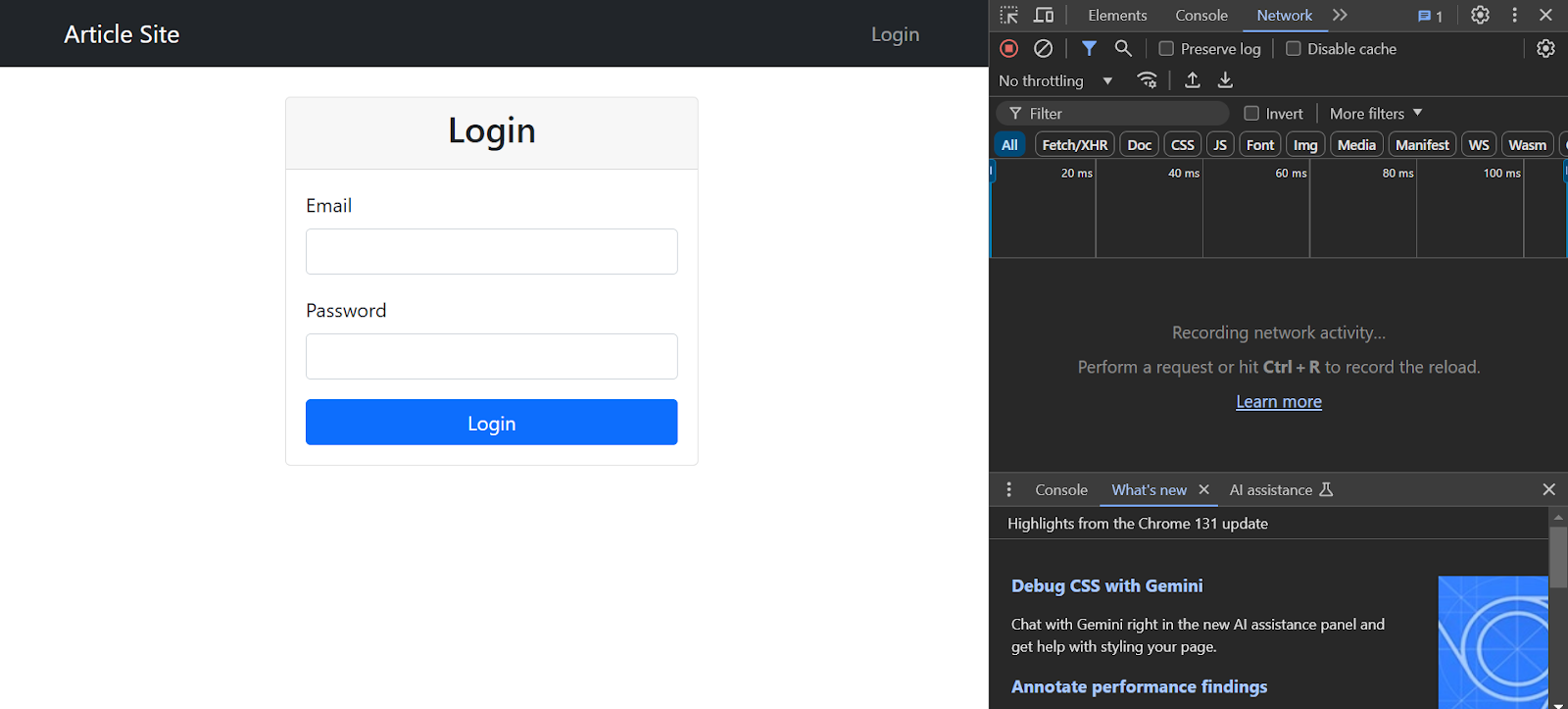
Enter your username and password and click ‘Login’. The inspect panel will show many requests; click the one named login. Then, go to the payload section to determine the items to include in the payload.
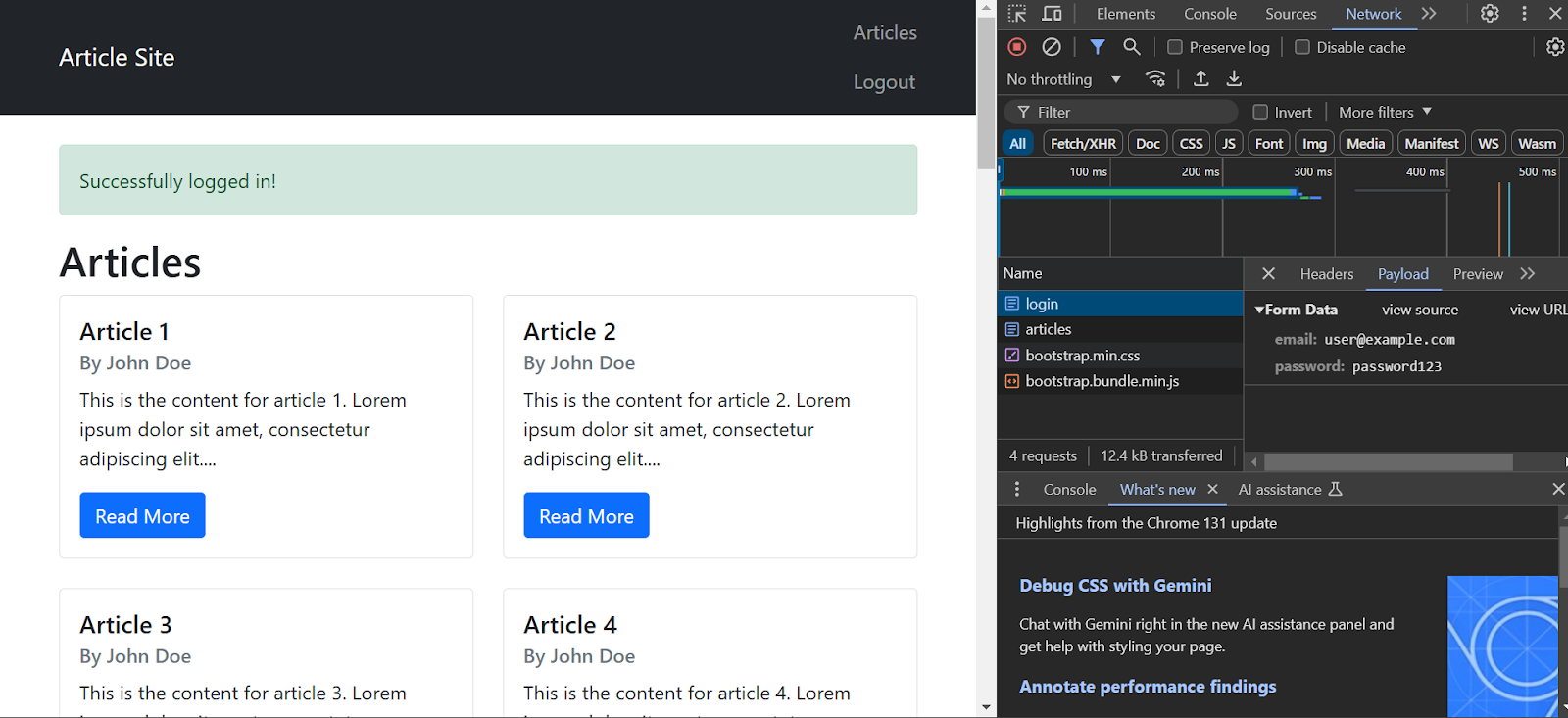
Here’s a function that accepts a login URL, target URL, username, and password and returns the HTML code of the protected page.
def basic_auth_scrape(login_url, target_url, username, password):
"""Basic authentication using requests."""
session = requests.Session()
# Login payload
login_data = {
'email': username,
'password': password
}
# Perform login
response = session.post(login_url, data=login_data)
if response.ok:
# Scrape the target page
protected_page = session.get(target_url)
return protected_page.text
return NoneThis function:
- Initializes a requests.session() object, which will automatically handle cookies.
- Makes a POST request to the login URL with the payload as you saw in the inspect panel.
- Makes a GET request to the target URL if the login is successful.
- Retrieves the target URL’s HTML source code.
Handling CSRF Tokens
Many sites also use Cross-Site Request Forgery (CSRF) tokens to ensure that malicious sites don’t make requests to a website authenticated by you. These tokens are different on every login page, so you need to scrape them every time.
You can check the payload after logging in to determine whether or not the site uses CSRF. If it’s present, you’ll see a csrf_token field, in addition to the username and password.
To find the element that contains the CSRF token, go back and inspect the login screen. Search for “csrf.”
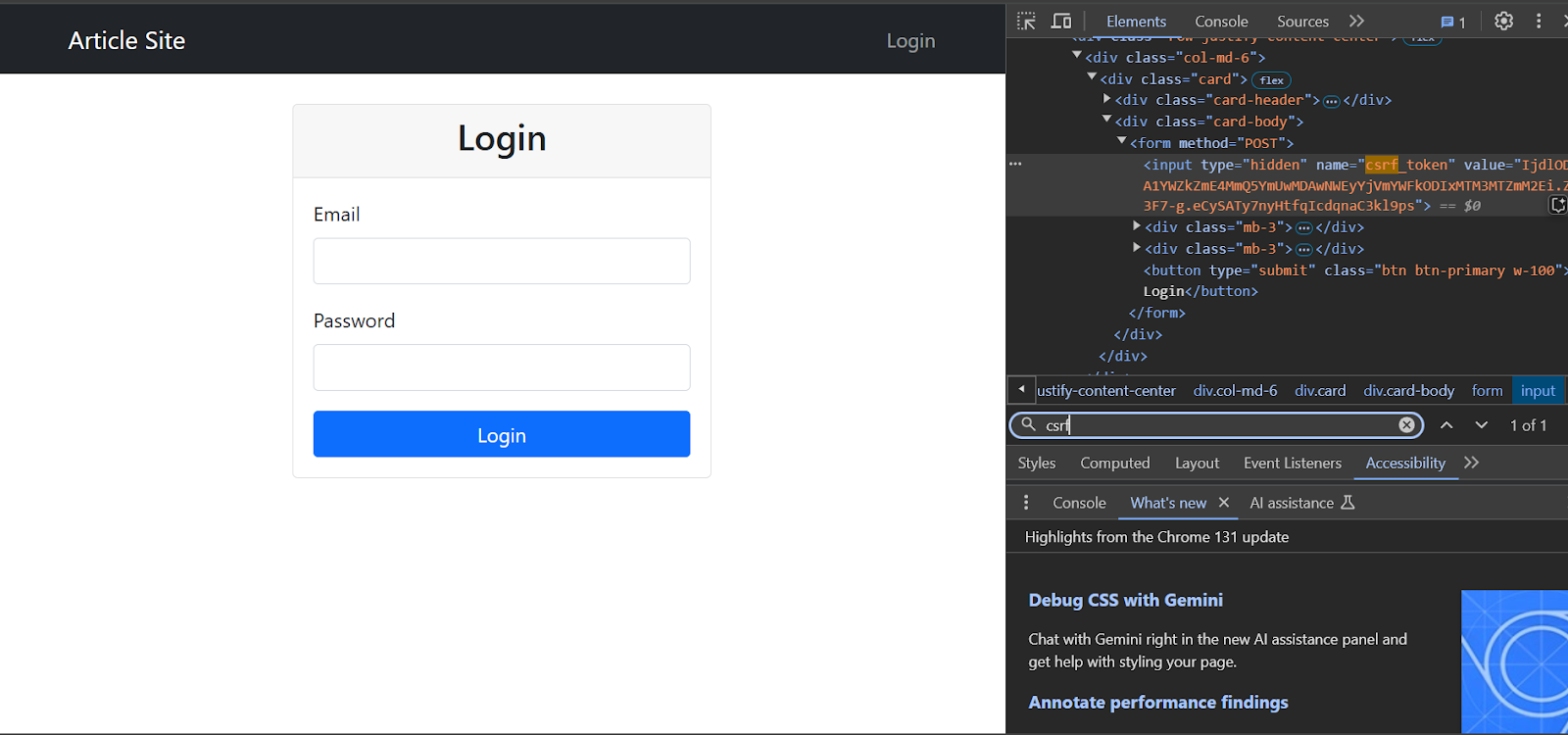
You can scrape this CSRF token and add it to the payload. Here’s a function that’ll do precisely that:
def csrf_auth_scrape(login_url, target_url, username, password):
"""Authentication with CSRF token handling."""
session = requests.Session()
# Get the login page first to extract CSRF token
login_page = session.get(login_url)
soup = BeautifulSoup(login_page.text, 'lxml')
# Find CSRF token (adjust selector based on website)
csrf_token = soup.find('input', {'name': 'csrf_token'})['value']
# Login payload with CSRF token
login_data = {
'email': username,
'password': password,
'csrf_token': csrf_token
}
# Perform login
response = session.post(login_url, data=login_data)
if response.ok:
# Scrape the target page
protected_page = session.get(target_url)
return protected_page.text
return NoneThis function:
- Initializes a requests.Session() object.
- Makes a GET request to the login URL.
- Parses the login page using BeautifulSoup.
- Finds the CSRF token from an input tag.
- Makes a POST request to the login URL with username, password, and the extracted CSRF token.
- Makes a GET request to the target URL and extracts the HTML from the response.
The CSRF Token Pattern May Differ
- Inspect the login page for hidden inputs; common names include csrf_token, _token, authenticity_token.
- Check Set-Cookie headers for XSRF-TOKEN or similar.
- If the token is in JavaScript, you may need regex or a headless browser to extract it.
- Add error handling if the token is missing (log and abort rather than crash).
Web Application Firewall
Some websites also use a web application firewall (WAF) that monitors the incoming traffic, checking for patterns using rule-based, statistical, or machine-learning algorithms to prevent attacks. However, these WAFs can also detect and block your scraper.
In such cases, scraping using a browser automation library like Playwright is your best bet. These libraries can mimic human behavior, allowing your web scraper to remain undetected.
Here’s a function that uses Playwright to input the credentials.
def playwright_auth_scrape(login_url, target_url, username, password):
"""Scraping using Playwright for JavaScript-heavy sites."""
from playwright.sync_api import sync_playwright
content = None
with sync_playwright() as p:
try:
browser = p.chromium.launch(headless=False)
context = browser.new_context()
page = context.new_page()
# Navigate to login page
page.goto(login_url, wait_until="networkidle")
# Fill login form (adjust selectors based on website)
page.fill('input[name="email"]', username)
page.fill('input[name="password"]', password)
# Click submit and wait for the navigation
page.click('button[type="submit"]')
page.wait_for_load_state("networkidle")
# Navigate to target URL
page.goto(target_url, wait_until="networkidle")
# Get the content
content = page.inner_html('body')
except Exception as e:
logging.error(f"Playwright error: {str(e)}")
return None
finally:
if 'browser' in locals():
browser.close()
return contentThis code:
- Launches a Playwright browser in headless mode.
- Creates a new context and a page within that context.
- Navigates to the login URL and waits until the page completely loads.
- Fills in the credentials using the fill() method.
- Clicks the submit button using the click() method.
- Extracts the inner HTML of the body tag.
Modern WAFs and bot managers may use TLS fingerprinting, behavioral heuristics, and device telemetry
Ensure that you:
- Use realistic user-agent and viewport; avoid headless unless necessary.
- Add realistic delays and mouse movements; avoid instant form fills and clicks.
- Consider residential proxies and rotating IPs for high-volume scraping.
Multi-Factor Authentication (MFA)
MFA adds another layer of complexity when trying to scrape data from authenticated websites. After entering your credentials, you also need to enter a one-time password. This password is either delivered to you (via email or SMS) or generated using a time-based algorithm (time-based one-time password or TOTP).
Understanding these authentication layers is essential, particularly as more platforms transition toward passkeys to provide a more secure, passwordless login experience.
Here is a function to login to a website using MFA with a TOTP:
def mfa_auth_scrape(login_url, target_url, username, password, mfa_secret=None):
"""Authentication with MFA support using Playwright."""
logger = logging.getLogger(__name__)
with sync_playwright() as p:
try:
browser = p.chromium.launch(headless=False)
page = browser.new_page()
# Handle login
logger.info("Attempting login with MFA...")
page.goto(login_url, wait_until="networkidle")
page.fill('input[name="email"]', username)
page.fill('input[name="password"]', password)
page.click('button[type="submit"]')
# Handle MFA if secret provided
if mfa_secret:
logger.info("Handling MFA...")
try:
totp = pyotp.TOTP(mfa_secret)
mfa_code = totp.now()
page.wait_for_selector('input[name="totp_code"]')
page.fill('input[name="totp_code"]', mfa_code)
page.press('input[name="totp_code"]', "Enter")
except Exception as e:
logger.error(f"MFA failed: {str(e)}")
return None
# Get target page content
logger.info("Navigating to target page...")
page.wait_for_load_state("networkidle")
page.goto(target_url, wait_until="networkidle")
content = page.content()
return content
except Exception as e:
logger.error(f"MFA auth error: {str(e)}")
return None
finally:
if 'browser' in locals():
browser.close()This function is a modified version of playwright_auth_scrape(). After logging in with credentials, the function:
- Passes the secret to pyotp.TOTP()
- Generates the current code using the now() method
- Selects the appropriate input field and enters the TOTP code
- Presses ‘Enter’
- Navigates to the target web page and returns the HTML code
A few things to consider:
- The pattern discussed only applies when you control the account and have the TOTP secret.
- SMS/email OTP and push-based MFA require out-of-band steps or integrations.
- Passkeys are the emerging standard that generally blocks automated logins.
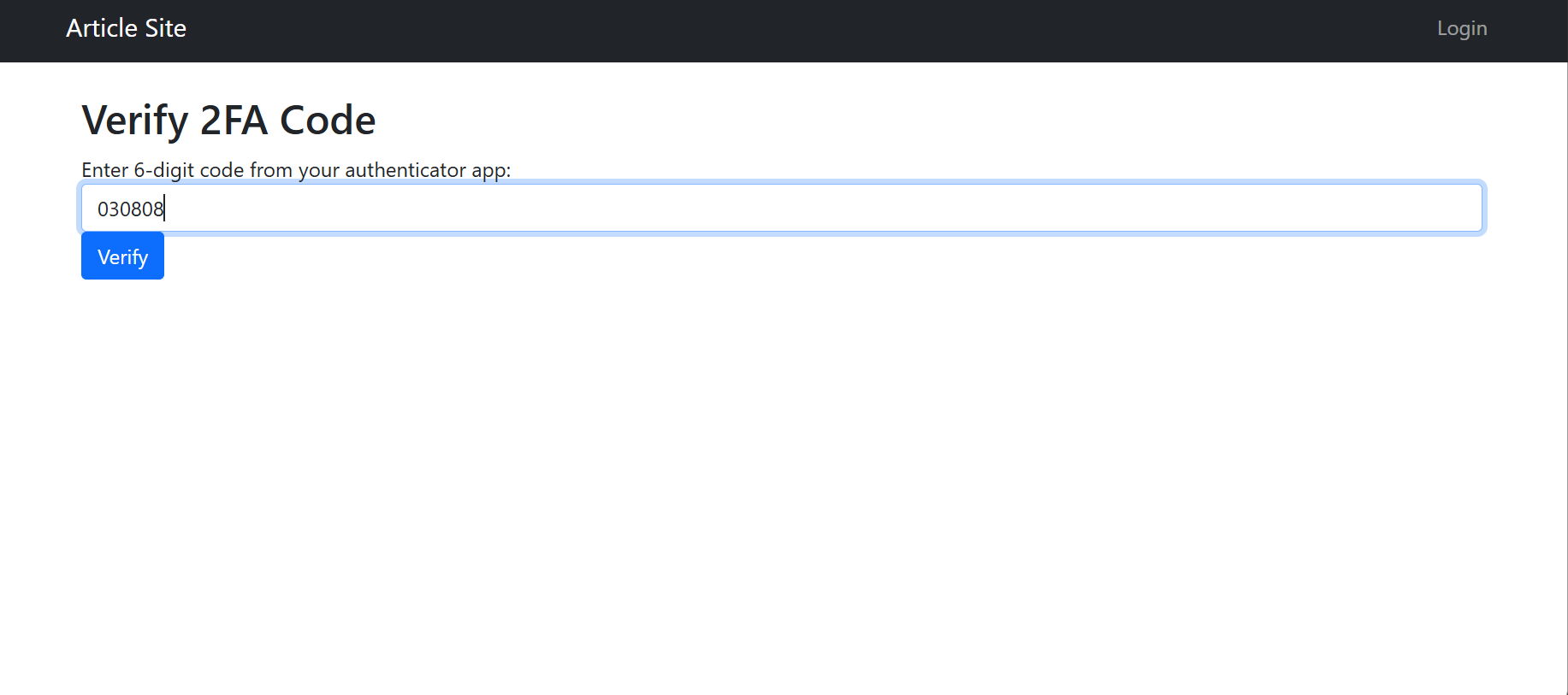
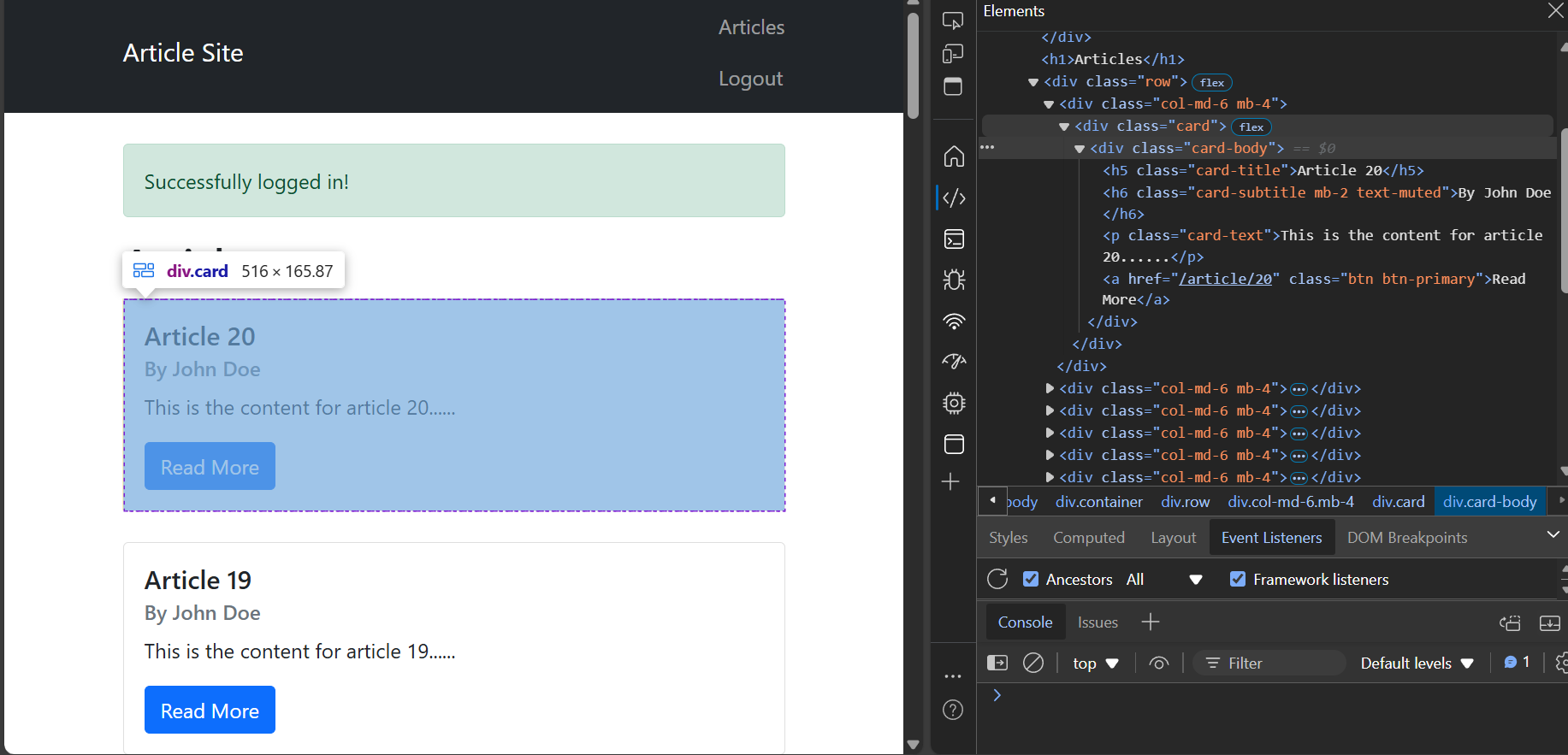
Below, you can view the complete code to scrape data from authenticated sites. This code scrapes article information from a mock server.
import requests
from bs4 import BeautifulSoup
from playwright.sync_api import sync_playwright
import time
import argparse
import logging
import json
import pyotp
def extract_data(content):
"""Extract data from HTML content."""
soup = BeautifulSoup(content, 'lxml')
# Extract data (adjust selectors based on website)
articles = soup.find_all('div', {'class': 'card-body'})
data = []
for article in articles:
title = article.find('h5', {'class': 'card-title'}).text
subtitle = article.find('h6', {'class': 'card-subtitle'}).text
content = article.find('p', {'class': 'card-text'}).text
data.append({
'title': title,
'subtitle': subtitle,
'content': content
})
return data
def basic_auth_scrape(login_url, target_url, username, password):
"""Basic authentication using requests."""
session = requests.Session()
# Login payload
login_data = {
'email': username,
'password': password
}
# Perform login
response = session.post(login_url, data=login_data)
if response.ok:
# Scrape the target page
protected_page = session.get(target_url)
return protected_page.text
return None
def csrf_auth_scrape(login_url, target_url, username, password):
"""Authentication with CSRF token handling."""
session = requests.Session()
# Get the login page first to extract CSRF token
login_page = session.get(login_url)
soup = BeautifulSoup(login_page.text, 'lxml')
# Find CSRF token (adjust selector based on website)
csrf_token = soup.find('input', {'name': 'csrf_token'})['value']
# Login payload with CSRF token
login_data = {
'email': username,
'password': password,
'csrf_token': csrf_token
}
# Perform login
response = session.post(login_url, data=login_data)
if response.ok:
# Scrape the target page
protected_page = session.get(target_url)
return protected_page.text
return None
def playwright_auth_scrape(login_url, target_url, username, password):
"""Scraping using Playwright for JavaScript-heavy sites."""
from playwright.sync_api import sync_playwright
content = None
with sync_playwright() as p:
try:
browser = p.chromium.launch(headless=False)
context = browser.new_context()
page = context.new_page()
# Navigate to login page
page.goto(login_url, wait_until="networkidle")
# Fill login form (adjust selectors based on website)
page.fill('input[name="email"]', username)
page.fill('input[name="password"]', password)
# Click submit and wait for navigation
page.click('button[type="submit"]')
page.wait_for_load_state("networkidle")
# Navigate to target URL
page.goto(target_url, wait_until="networkidle")
# Get the content
content = page.inner_html('body')
except Exception as e:
logging.error(f"Playwright error: {str(e)}")
return None
finally:
if 'browser' in locals():
browser.close()
return content
def mfa_auth_scrape(login_url, target_url, username, password, mfa_secret=None):
"""Authentication with MFA support using Playwright."""
logger = logging.getLogger(__name__)
with sync_playwright() as p:
try:
browser = p.chromium.launch(headless=False)
page = browser.new_page()
# Handle login
logger.info("Attempting login with MFA...")
page.goto(login_url, wait_until="networkidle")
page.fill('input[name="email"]', username)
page.fill('input[name="password"]', password)
page.click('button[type="submit"]')
# Handle MFA if secret provided
if mfa_secret:
logger.info("Handling MFA...")
try:
totp = pyotp.TOTP(mfa_secret)
mfa_code = totp.now()
page.wait_for_selector('input[name="totp_code"]')
page.fill('input[name="totp_code"]', mfa_code)
page.press('input[name="totp_code"]', "Enter")
except Exception as e:
logger.error(f"MFA failed: {str(e)}")
return None
# Get target page content
logger.info("Navigating to target page...")
page.wait_for_load_state("networkidle")
page.goto(target_url, wait_until="networkidle")
content = page.content()
return content
except Exception as e:
logger.error(f"MFA auth error: {str(e)}")
return None
finally:
if 'browser' in locals():
browser.close()
def setup_logging():
"""Setup logging configuration."""
logging.basicConfig(
level=logging.INFO,
format='%(asctime)s - %(levelname)s - %(message)s'
)
def get_auth_method(method_name):
"""Get the authentication method based on name."""
methods = {
'basic': basic_auth_scrape,
'csrf': csrf_auth_scrape,
'playwright': playwright_auth_scrape,
'mfa': mfa_auth_scrape
}
return methods.get(method_name)
def main():
parser = argparse.ArgumentParser(description='Authenticate and scrape website content')
parser.add_argument('--login-url', required=True, help='URL of the login page')
parser.add_argument('--target-url', required=True, help='URL of the page to scrape')
parser.add_argument('--username', required=True, help='Login username')
parser.add_argument('--password', required=True, help='Login password')
parser.add_argument(
'--method',
required=True,
choices=['basic', 'csrf', 'playwright', 'mfa'],
help='Authentication method to use'
)
parser.add_argument('--mfa-secret', help='TOTP secret key for MFA authentication')
args = parser.parse_args()
# Setup logging
setup_logging()
logger = logging.getLogger(__name__)
# Get the selected authentication method
auth_method = get_auth_method(args.method)
logger.info(f"Using {args.method} authentication method")
try:
# Execute the selected method
if args.method == 'mfa':
content = auth_method(args.login_url, args.target_url,
args.username, args.password, args.mfa_secret)
else:
content = auth_method(args.login_url, args.target_url,
args.username, args.password)
if content:
logger.info("Authentication and scraping successful")
extracted_data = extract_data(content)
with open('data.json', 'w') as f:
json.dump(extracted_data, f, indent=4)
logger.info("Data saved to data.json")
else:
logger.error("Authentication or scraping failed")
except Exception as e:
logger.error(f"Error: {str(e)}")
if __name__ == "__main__":
main()This code also includes two additional functions:
- extract_data(): This function accepts the HTML code returned by other functions mentioned above and extracts the required data.
- main(): This function integrates all the functions and sets up the script to accept arguments during script execution. It also writes extracted data as a JSON file.
Conclusion
You can scrape data from authenticated sites by understanding various authentication mechanisms and using appropriate tools. However, you need to be more careful while ensuring compliance during authenticated website scraping. Ensure you have permission to do so.
If you need public data, ScrapeHero has got you covered. Our web scraping service can also take care of the compliance regarding scraping data from unauthenticated sites.
ScrapeHero is a web scraping service provider. We can build enterprise-grade scraping solutions just for you. Our services covers the entire data pipeline, from data extraction to providing custom AI solutions.